标签 Node.js 下的文章

Node.js 4.0.0 已经发布了。这是和 io.js 合并之后的首个稳定版本,它带来了一系列的新特性,支持 ES 6的大部分特性。已经有很多 ES 6 的特性介绍了,这里我们介绍一下该怎么使用它们。

1. 模板字符串

如果你要在 JavaScript 中创建多行字符串,你可能会使用如下的语法:

var message = [
    'The quick brown fox',
    'jumps over',
    'the lazy dog'
].join('\n');

对于少量字符串这还算合适,但是如果比较多就会显得混乱。不过,有个聪明的开发者提出了一个叫 multiline 的技巧:

var multiline = require('multiline');
var message = multiline(function () {/*
    The quick brown fox
    jumps over
    the lazy dog
*/});

幸运的是,ES 6 为我们带来了模板字符串:

var message = `
    The quick brown fox
        jumps over
        the lazy dog
`;

此外,它还给我们带来了字符串内插:

var name = 'Schroedinger';

// 不要这样做 ...
var message = 'Hello ' + name + ', how is your cat?';
var message = ['Hello ', name, ', how is your cat?'].join('');
var message = require('util').format('Hello %s, how is your cat?', name);

// 应该这样做 ...
var message = `Hello ${name}, how is your cat?`;

在 MDN 上查看模板字符串的细节.

2. 类

在 ES5 中定义类看起来有点奇怪,也比较麻烦:

var Pet = function (name) {
    this._name = name;
};

Pet.prototype.sayHello = function () {
    console.log('*scratch*');
};

Object.defineProperty(Pet.prototype, 'name', {
  get: function () {
    return this._name;
  }
});


var Cat = function (name) {
    Pet.call(this, name);
};

require('util').inherits(Cat, Pet);

Cat.prototype.sayHello = function () {
    Pet.prototype.sayHello.call(this);
    console.log('miaaaauw');
};

幸运的是,在 Node.js 中可以使用新的 ES6 格式:

class Pet {
    constructor(name) {
        this._name = name;
    }
    sayHello() {
        console.log('*scratch*');
    }
    get name() {
        return this._name;
    }
}

class Cat extends Pet {
    constructor(name) {
        super(name);
    }
    sayHello() {
        super.sayHello();
        console.log('miaaaauw');
    }
}

有 extends 关键字、构造子、调用超类及属性,是不是很棒?还不止这些,看看 MDN 上的更详细的介绍。

3. 箭头函数

在函数里面对 this 的动态绑定总是会导致一些混乱,人们一般是这样用的:

Cat.prototype.notifyListeners = function () {
    var self = this;
    this._listeners.forEach(function (listener) {
        self.notifyListener(listener);
    });
};
Cat.prototype.notifyListeners = function () {
    this._listeners.forEach(function (listener) {
        this.notifyListener(listener);
    }.bind(this));
};

现在你可以使用胖箭头函数了:

Cat.prototype.notifyListeners = function () {
    this._listeners.forEach((listener) => {
        this.notifyListener(listener);
    });
};

了解箭头函数的更多细节。.

4. 对象字面量

使用对象字面量,你现在有了很漂亮的快捷方式:

var age = 10, name = 'Petsy', size = 32;

// 不要这样做 ...
var cat = {
    age: age,
    name: name,
    size: size
};

// ... 而是这样做 ...
var cat = {
    age,
    name,
    size
};

此外,你现在可以很容易地 给你的对象字面量添加函数

5. Promise

不用再依赖像 bluebirdQ这样的第三方库了,你现在可以使用 原生的 promise. 它们公开了如下 API:

var p1 = new Promise(function (resolve, reject) {});
var p2 = Promise.resolve(20);
var p3 = Promise.reject(new Error());
var p4 = Promise.all(p1, p2);
var p5 = Promise.race(p1, p2);

// 显然
p1.then(() => {}).catch(() => {});

6. 字符串方法

我们也有了一系列新的字符串功能:

// 在几种情况下可以替代 `indexOf()`
name.startsWith('a')
name.endsWith('c');
name.includes('b');

// 重复字符串三次
name.repeat(3);

去告诉那些使用 Ruby 的家伙吧!字符串现在也 对 unicode 支持更好了

7. let 和 const

猜猜下列函数调用的返回值:

var x = 20;
(function () {
    if (x === 20) {
        var x = 30;
    }
    return x;
}()); // -> undefined

是的, undefined。使用 let 替代 var ,你会得到预期的行为:

let x = 20;
(function () {
    if (x === 20) {
        let x = 30;
    }
    return x;
}()); // -> 20

原因是什么呢? var 是函数作用域,而 let 是块级作用域(如大部分人所预期的)。因此,可以说 let 是一个新var。 你可以在 MDN 上了解更多细节

此外,Node.js 也支持 const 关键字了,它可以防止你为同一个引用赋予不同的值:

var MY_CONST = 42; // no, no
const MY_CONST = 42; // yes, yes

MY_CONST = 10 // 使用了 const ,这就不行了

结语

Node.js 4.0.0 带来了更多的 ES6 特性,我希望这七个例子可以吸引你升级到最新版本。

还有更多的语言特性呢(例如,maps/sets, 符号和生成器,这里只提到了一点)。你可以看看 Node.js 4.0.0 的 ES6 概览。 赶快升级吧!
如果你要在Ubuntu 15.04上安装Node.js的话,这篇教程对你来说肯定很重要。Node.js从本质上来说就是一个运行在服务端上的封装好了输入输出流的javascript程序。Node.js巧妙的使用单线程的事件循环来处理高吞吐量和非阻塞IO。同时它也是一个提供了通过操作系统读写文件和网络操作功能的平台层。所以这篇文章将展示在Ubuntu 15.04 server上不同的安装Node.Js的方式。

安装Node.JS 的方法

有许多安装Node.JS的不同的方法,我们可以选择其一。通过本篇文章我们将手把手带着你在Ubuntu 15.04上安装Node.Js,在此之前请卸载旧版本的包以免发生包冲突。

  • 从源代码安装Node.JS
  • 用包管理器安装Node.JS
  • 从Github远程库安装Node.JS
  • 用NVM安装Node.JS

1) 从源代码安装Node.JS

让我们开始从源代码安装Node.JS之前,请确认系统上的所有的依赖包都已经更新到最新版本。然后跟着以下步骤来开始安装:

步骤1: 升级系统

用以下命令来升级系统,并且安装一些Node.JS必要的包。

root@ubuntu-15:~# apt-get update
root@ubuntu-15:~# apt-get install python gcc make g++

步骤2: 获取Node.JS的源代码

安装好依赖包之后我们可以从官方网站上下载Node.JS的源代码。下载以及解压的命令如下:

root@ubuntu-15:~# wget http://nodejs.org/dist/v0.12.4/node-v0.12.4.tar.gz
root@ubuntu-15:~# tar zxvf node-v0.12.4.tar.gz

步骤3: 开始安装

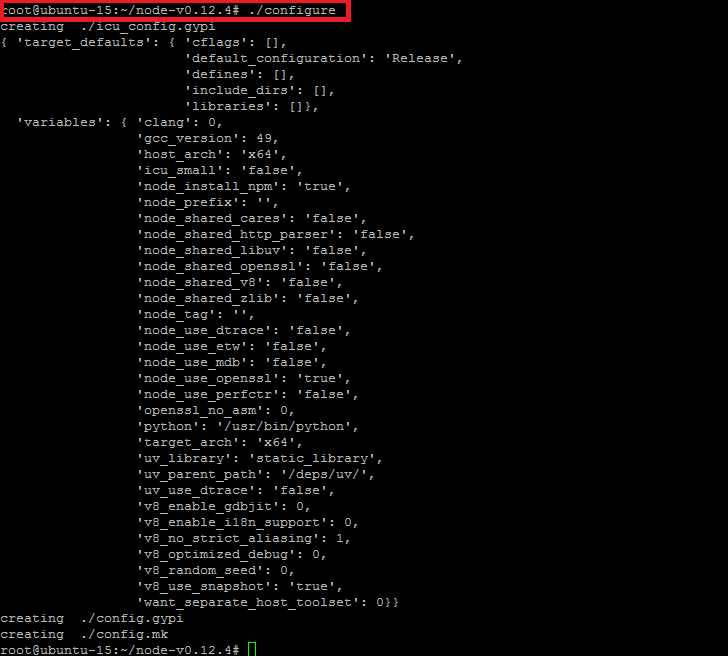
现在我们进入源代码的目录,然后运行.configure文件

NodeJS Configure

root@ubuntu-15:~# ls
node-v0.12.4 node-v0.12.4.tar.gz
root@ubuntu-15:~# cd node-v0.12.4/
root@ubuntu-15:~/node-v0.12.4# ./configure
root@ubuntu-15:~/node-v0.12.4# make install

安装后测试

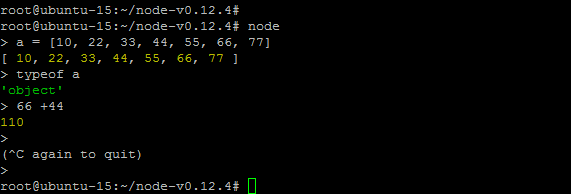
只要运行一下上面的命令就顺利安装好了Node.JS,现在我们来确认一下版本信息和测试以下Node.JS是否可以运行输出。

root@ubuntu-15:~/node-v0.12.4# node -v
v0.12.4

Node.Js Test

创建一个以.js为扩展名的文件然后用Node的命令运行

root@ubuntu-15:~/node-v0.12.4# touch helo_test.js
root@ubuntu-15:~/node-v0.12.4# vim helo_test.js
console.log('Hello World');

现在我们用Node的命令运行文件

root@ubuntu-15:~/node-v0.12.4# node helo_test.js
Hello World

输出的结果证明我们已经成功的在Ubuntu 15.04安装好了Node.JS,同时我们也能运行JavaScript文件。

2) 利用包管理器安装Node.JS

在Ubuntu下用包管理器安装Node.JS是非常简单的,只要增加NodeSource的个人软件包档案(PPA)即可。

我们将下面通过PPA安装Node.JS。

步骤1: 用curl获取源代码

在我们用curl获取源代码之前,我们必须先升级操作系统,然后用curl命令获取NodeSource添加到本地仓库。

root@ubuntu-15:~#apt-get update
root@ubuntu-15:~# curl -sL https://deb.nodesource.com/setup | sudo bash -

curl将运行以下任务

## Installing the NodeSource Node.js 0.10 repo...
## Populating apt-get cache...
## Confirming "vivid" is supported...
## Adding the NodeSource signing key to your keyring...
## Creating apt sources list file for the NodeSource Node.js 0.10 repo...
## Running `apt-get update` for you...
Fetched 6,411 B in 5s (1,077 B/s)
Reading package lists... Done
## Run `apt-get install nodejs` (as root) to install Node.js 0.10 and npm

步骤2: 安装NodeJS和NPM

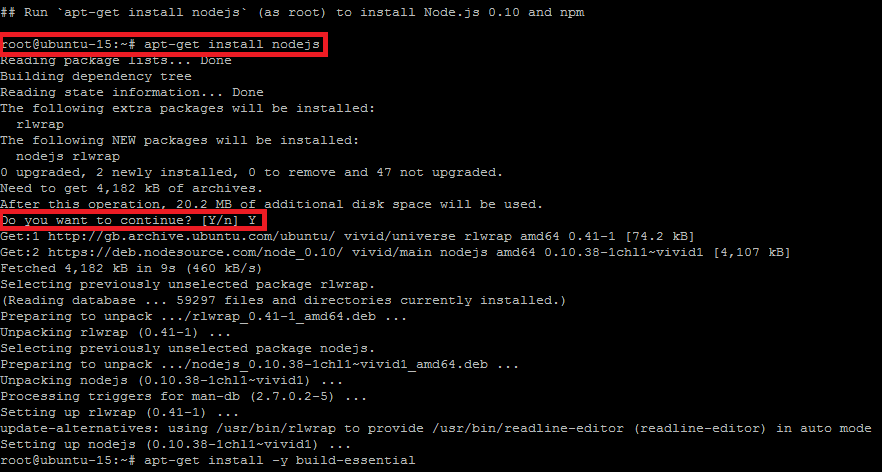
运行以上命令之后如果输出如上所示,我们可以用apt-get命令来安装NodeJS和NPM包。

root@ubuntu-15:~# apt-get install nodejs

NodeJS Install

步骤3: 安装一些必备的工具

通过以下命令来安装编译安装一些我们必需的本地插件。

root@ubuntu-15:~# apt-get install -y build-essential

通过Node.JS Shell来测试

测试Node.JS的步骤与之前使用源代码安装相似,通过以下node命令来确认Node.JS是否完全安装好:

root@ubuntu-15:~# node
> console.log('Node.js Installed Using Package Manager');
Node.js Installed Using Package Manager

root@ubuntu-15:~# node
> a = [1,2,3,4,5]
[ 1, 2, 3, 4, 5 ]
> typeof a
'object'
> 5 + 2
7
>
(^C again to quit)
>
root@ubuntu-15:~#

使用NodeJS应用进行简单的测试

REPL是一个Node.js的shell,任何有效的JavaScript代码都能在REPL下运行通过。所以让我们看看在Node.JS下的REPL是什么样子吧。

root@ubuntu-15:~# node
> var repl = require("repl");
undefined
> repl.start("> ");

Press Enter and it will show out put like this:
> { domain: null,
_events: {},
_maxListeners: 10,
useGlobal: false,
ignoreUndefined: false,
eval: [Function],
inputStream:
{ _connecting: false,
_handle:
{ fd: 0,
writeQueueSize: 0,
owner: [Circular],
onread: [Function: onread],
reading: true },
_readableState:
{ highWaterMark: 0,
buffer: [],
length: 0,
pipes: null,
...
...

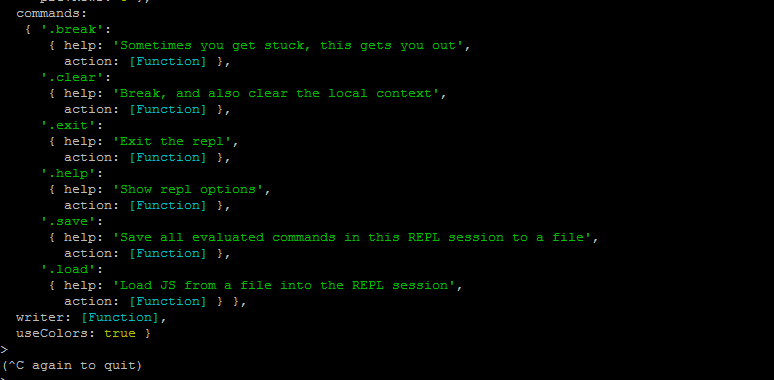
以下是可以在REPL下使用的命令列表

REPL Manual

使用NodeJS的包管理器

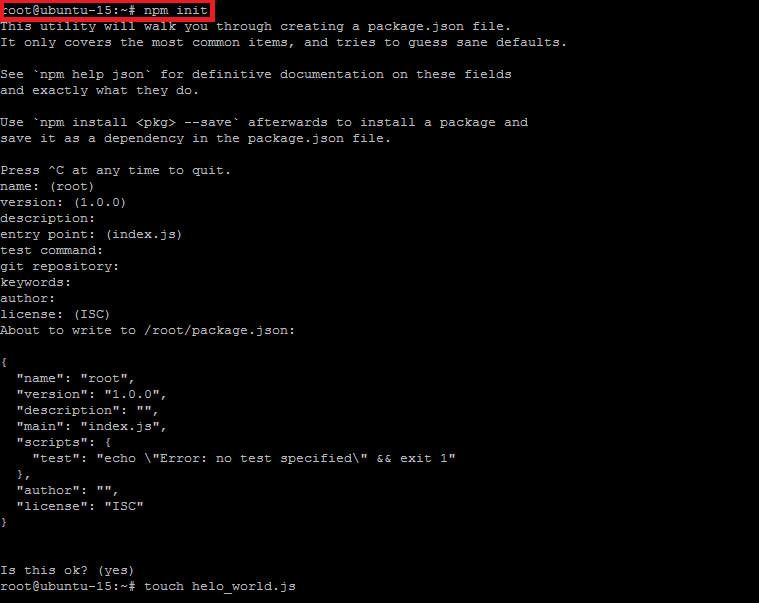
NPM是一个提供给node脚本持续生命力的命令行工具,它能通过package.json来安装和管理依赖包。最开始从初始化命令init开始

root@ubuntu-15:~# npm init

NPM starting

3) 从Github远程库安装Node.JS

在这个方法中我们需要一些步骤来把Node.JS从Github的远程的仓库克隆到本地仓库目录

在开始克隆(clone)包到本地并且配制之前,我们要先安装以下依赖包

root@ubuntu-15:~# apt-get install g++ curl make libssl-dev apache2-utils git-core

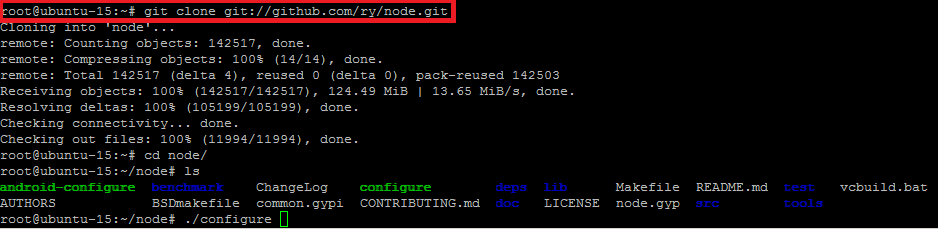
现在我们开始用git命令克隆到本地并且转到配制目录

root@ubuntu-15:~# git clone git://github.com/ry/node.git
root@ubuntu-15:~# cd node/

Git Clone NodeJS

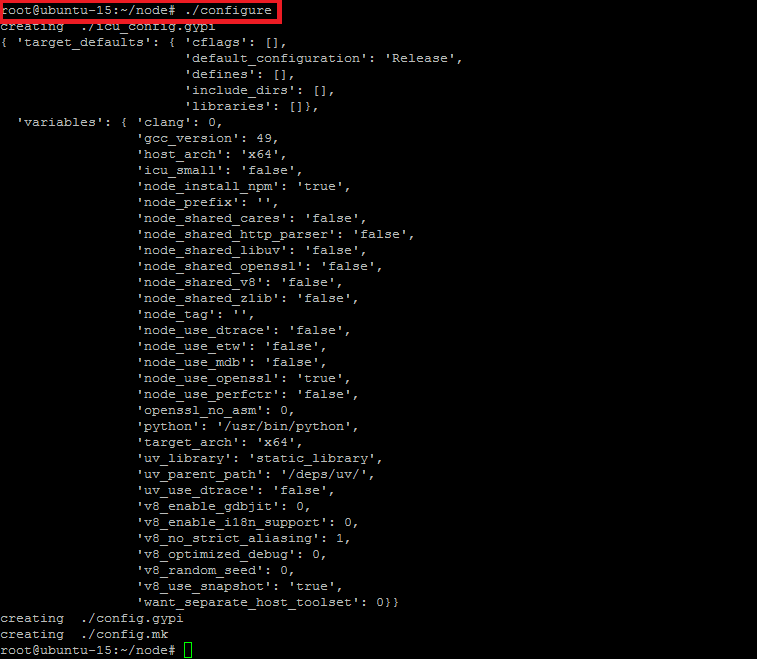
clone仓库之后,通过运行.config命令来编译生成完整的安装包。

root@ubuntu-15:~# ./configure

Configure Node

运行make install命令之后耐心等待几分钟,程序将会安装好Node.JS。

root@ubuntu-15:~/node# make install
root@ubuntu-15:~/node# node -v
v0.13.0-pre

测试Node.JS

root@ubuntu-15:~/node# node
> a = [1,2,3,4,5,6,7]
[ 1, 2, 3, 4, 5, 6, 7 ]
> typeof a
'object'
> 6 + 5
11
>
(^C again to quit)
>
root@ubuntu-15:~/node#

4) 通过NVM安装Node.JS

在最后一种方法中我们我们将用NVM来比较容易安装Node.JS。安装和配制Node.JS,这是最好的方法之一,它可以供我们选择要安装的版本。

在安装之前,请确认本机以前的安装包已经被卸载。

步骤1: 安装依赖包

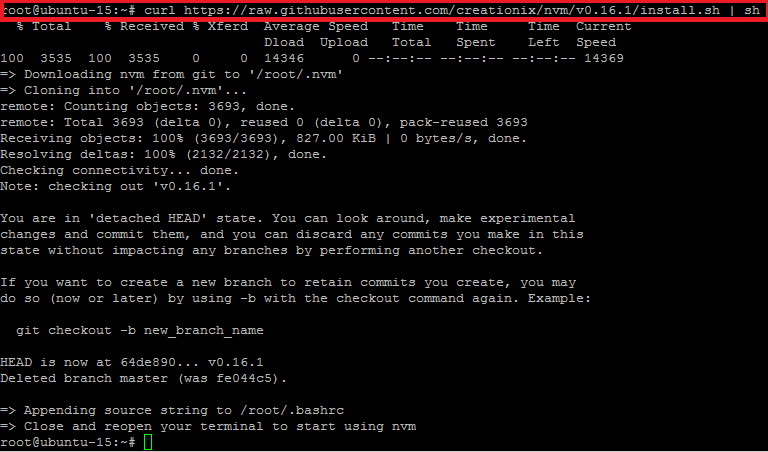
首先升级Ubuntu Server系统,然后安装以下安装Node.JS和使用NVM所要依赖的包。用curl命令从git上下载NVM到本地仓库:

root@ubuntu-15:~# apt-get install build-essential libssl-dev
root@ubuntu-15:~# curl https://raw.githubusercontent.com/creationix/nvm/v0.16.1/install.sh | sh

NVM Curl

步骤2: 修改Home环境

用curl从NVM下载必需的包到用户的home目录之后,我们需要修改bash的配置文件添加NVM,之后只要重新登录中断或者用如下命令更新即可。

root@ubuntu-15:~# source ~/.profile

现在我们可以用NVM来设置默认的NVM的版本,或者用如下命令来指定之前版本:

root@ubuntu-15:~# nvm ls
root@ubuntu-15:~# nvm alias default 0.12.4

NVM Default

步骤3: 使用NVM

我们已经通过NVM成功的安装了Node.JS,所以我们现在可以使用各种有用的命令。

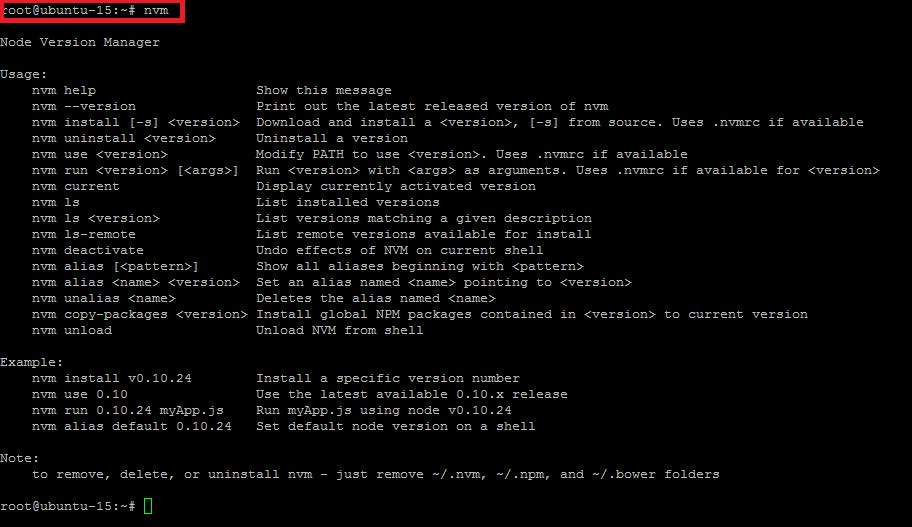
NVM Manual

总结

现在我们已经准备好了在服务端安装Node.JS,你可以从我们说的四种方式中选择最合适你的方式在最新的Ubuntu 15.04上来安装Node.JS,安装好之后你就可以利用Node.JS来编写你的代码。


via: http://linoxide.com/ubuntu-how-to/setup-node-js-ubuntu-15-04-different-methods/

作者:Kashif Siddique 译者:NearTan 校对:wxy

本文由 LCTT 原创翻译,Linux中国 荣誉推出

今天我们将会在Ubuntu Server 14.04 LTS (Trusty)上安装一个博客平台Ghost。

Ghost是一款设计优美的发布平台,很容易使用且对任何人都免费。它是免费的开源软件(FOSS),它的源码在Github上。截至2015年1月(LCTT 译注:原文为2014,应为2015),它的界面很简单还有分析面板。编辑使用的是很便利的分屏显示。

因此有了这篇步骤明确的在Ubuntu Server上安装Ghost的教程:

1. 升级Ubuntu

第一步是运行Ubuntu软件升级并安装一系列需要的额外包。

sudo apt-get update
sudo apt-get upgrade -y
sudo aptitude install -y build-essential zip vim wget

2. 下载并安装 Node.js 源码

wget http://nodejs.org/dist/node-latest.tar.gz
tar -xzf node-latest.tar.gz
cd node-v*

现在,我们使用下面的命令安装Node.js:

./configure
make
sudo make install

3. 下载并安装Ghost

sudo mkdir -p /var/www/
cd /var/www/
sudo wget https://ghost.org/zip/ghost-latest.zip
sudo unzip -d ghost ghost-latest.zip
cd ghost/
sudo npm install --production

4. 配置Ghost

sudo nano config.example.js

在“Production”字段,将:

host: '127.0.0.1',

修改成

host: '0.0.0.0',

创建Ghost用户

sudo adduser --shell /bin/bash --gecos 'Ghost application' ghost
sudo chown -R ghost:ghost /var/www/ghost/

现在启动Ghost,你需要以“ghost”用户登录。

su - ghost
cd /var/www/ghost/

现在,你已经以“ghost”用户登录,并可启动Ghost:

npm start --production

via: http://linoxide.com/ubuntu-how-to/install-ghost-ubuntu-server-14-04/

作者:Arun Pyasi 译者:geekpi 校对:wxy

本文由 LCTT 原创翻译,Linux中国 荣誉推出

GitHub 开发的文本编辑器 Atom 最近刚刚发布了0.177.0版。在这次更新里面,也许有一些你所不知道的 Atom 的趣事。

Atom 是基于 Chrome 开发的

Atom 是完全基于web技术实现的。底层的架构是基于Chromium(是的就是Google Chrome浏览器的Chromium架构),所有的窗口都是一个本地渲染的网页。

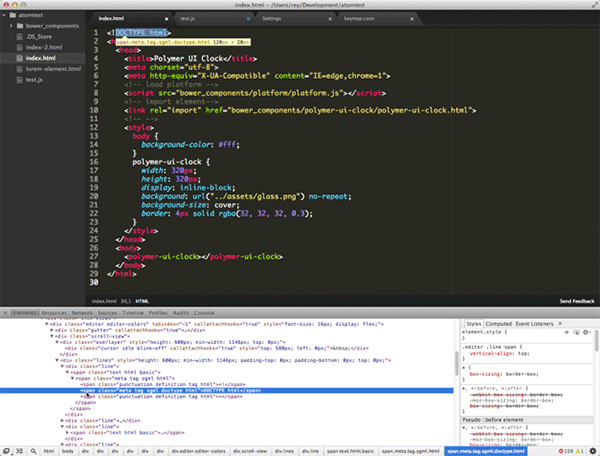
当我们按下快捷键 Alt+Command+I 时,就可以看到熟悉的Chrome浏览器的调试界面了。

本次 0.177.0 版本是基于 Chrome 40 所开发的。

弃 Node.js 而用 io.js

Atom 之前是采用了 node.js 来访问文件系统和包管理。这样就让Atom的包管理具有很强的灵活性和可扩展性。面对浩如烟好的npm资源,Atom 的可配置型也变得异常突出。

本次发布的0.177.0版,其中一个引入注目的变化是从 Node.js 切换到了 io.js。

io.js是Node.js的分支,Node.js社区发生分裂后由核心开发者在去年12月创建的,已经发布了v1.1版,目前开发非常活跃。Atom是切换到io.js的一个重量级项目。

另外,也使用了 6to5 的 JavaScript 预处理器。