分类 技术 下的文章

Cron 是您可以在任何类 Unix 操作系统中找到的最有用的实用程序之一。它用于安排命令在特定时间执行。这些预定的命令或任务被称为 “Cron 任务”。Cron 通常用于运行计划备份、监视磁盘空间、定期删除不再需要的文件(例如日志文件)、运行系统维护任务等等。在本简要指南中,我们将看到 Linux 中 Cron 任务的基本用法。

Cron 任务入门指南

cron 任务的典型格式是:

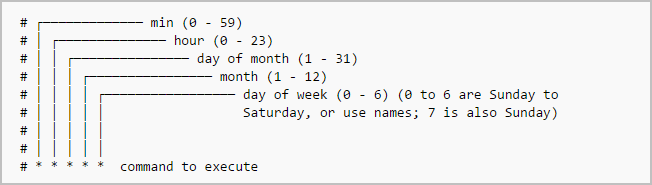
分钟(0-59) 小时(0-24) 日(1-31) 月(1-12) 星期(0-6) 要执行的命令

只需记住 cron 任务的格式或打印下面的插图并将其放在你桌面上即可。

在上图中,星号表示特定的时间块。

要显示当前登录用户的 crontab 文件的内容:

$ crontab -l

要编辑当前用户的 cron 任务,请执行以下操作:

$ crontab -e

如果这是第一次编辑此文件,会询问你使用哪个编辑器来编辑此文件。

no crontab for sk - using an empty one

Select an editor. To change later, run 'select-editor'.
1. /bin/nano <---- easiest
2. /usr/bin/vim.basic
3. /usr/bin/vim.tiny
4. /bin/ed

Choose 1-4 [1]:

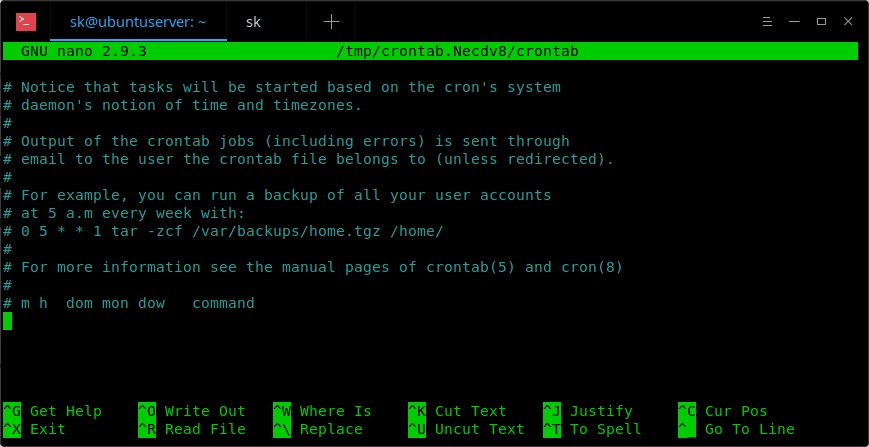
选择适合你的编辑器。这里是一个示例 crontab 文件的样子。

在这个文件中,你需要添加你的 cron 任务。

要编辑其他用户的 crontab,例如 ostechnix,请执行:

$ crontab -u ostechnix -e

让我们看看一些例子。

每分钟 执行一次 cron 任务,需使用如下格式。

* * * * * <command-to-execute>

要每 5 分钟运行一次 cron 任务,请在 crontab 文件中添加以下内容。

*/5 * * * * <command-to-execute>

要在每 1/4 个小时(每 15 分钟)运行一次 cron 任务,请添加以下内容:

*/15 * * * * <command-to-execute>

要每小时的第 30 分钟运行一次 cron 任务,请运行:

30 * * * * <command-to-execute>

您还可以使用逗号定义多个时间间隔。例如,以下 cron 任务每小时运行三次,分别在第 0、 5 和 10 分钟运行:

0,5,10 * * * * <command-to-execute>

每半小时运行一次 cron 任务:

*/30 * * * * <command-to-execute>

每小时运行一次:

0 * * * * <command-to-execute>

每 2 小时运行一次:

0 */2 * * * <command-to-execute>

每天运行一项(在 00:00 运行):

0 0 * * * <command-to-execute>

每天凌晨 3 点运行:

0 3 * * * <command-to-execute>

每周日运行:

0 0 * * SUN <command-to-execute>

或使用,

0 0 * * 0 <command-to-execute>

它将在每周日的午夜 00:00 运行。

星期一至星期五每天运行一次,亦即每个工作日运行一次:

0 0 * * 1-5 <command-to-execute>

这项工作将于 00:00 开始。

每个月运行一次:

0 0 1 * * <command-to-execute>

于每月第 1 天的 16:15 运行:

15 16 1 * * <command-to-execute>

每季度运行一次,亦即每隔 3 个月的第 1 天运行:

0 0 1 */3 * <command-to-execute>

在特定月份的特定时间运行:

5 0 * 4 * <command-to-execute>

每个四月的 00:05 运行。

每 6 个月运行:

0 0 1 */6 * <command-to-execute>

这个定时任务将在每六个月的第一天的 00:00 运行。

每年运行:

0 0 1 1 * <command-to-execute>

这项 cron 任务将于 1 月份的第一天的 00:00 运行。

我们也可以使用以下字符串来定义任务。

@reboot 在每次启动时运行一次。 @yearly 每年运行一次。 @annually(和 @yearly 一样)。 @monthly 每月运行一次。 @weekly 每周运行一次。 @daily 每天运行一次。 @midnight (和 @daily 一样)。 @hourly 每小时运行一次。

例如,要在每次重新启动服务器时运行任务,请将此行添加到您的 crontab 文件中。

@reboot <command-to-execute>

要删除当前用户的所有 cron 任务:

$ crontab -r

还有一个名为 crontab.guru 的专业网站,用于学习 cron 任务示例。这个网站提供了很多 cron 任务的例子。

有关更多详细信息,请查看手册页。

$ man crontab

那么,就是这样。到此为止,您应该对 cron 任务以及如何实时使用它们有了一个基本的了解。后续还会介绍更多的优秀工具。敬请关注!!

干杯!


via: https://www.ostechnix.com/a-beginners-guide-to-cron-jobs/

作者:SK 选题:lujun9972 译者:KevinSJ 校对:wxy

本文由 LCTT 原创编译,Linux中国 荣誉推出

Ubuntu 18.04 版本已经发布,并得到各个社区的一致好评,因为 Ubuntu 18.04 可能是 Ubuntu 多年来最令人兴奋的版本。

通常情况下,Ubuntu 及其衍生版可以使用命令从一个版本升级到最新版本或者其它版本,这也是官方推荐的升级方式。

Ubuntu 18.04 特性/亮点

这次更新包含大量改进和新功能,这里只列举的几个主要的。如果您想要更详细的更新信息,请访问 Ubuntu 18.04 官方 页面。

  • 使用 Linux 4.15 内核,提供了从上游继承的新功能
  • 它具有最新版本的 GNOME 3.28
  • 它提供了与 RHEL 相似的最简安装选项,该选项可安装只包含一个 web 浏览器和核心系统程序的基本桌面环境
  • 对于新安装,交换文件将取代默认的交换分区
  • 您可以启用 Livepatch 安装内核更新而无需重新启动
  • 笔记本电脑在使用电池供电时会在无操作 20 分钟后自动待机
  • 不再提供 32 位的 Ubuntu 桌面安装程序映像

注意:

  1. 不要忘记备份重要数据。如果升级出现问题,我们将重新安装并恢复数据。
  2. 安装所需时间取决于您的网络状况和安装的程序。

zzupdate 是什么?

我们可以只通过一条命令使用 zzupdate 工具中将 Ubuntu PC/Server 从一个版本升级到另一个版本。它是一个自由开源工具,使用它不需要任何脚本知识,因为它只需要配置文件即可运行。

工具中提供两个默认 shell 文件。setup.sh 自动安装、更新代码,将脚本转换为一个简单的 zzupdate shell 命令。zzupdate.sh 将执行版本间的升级。

如何安装 zzupdate?

要安装 zzupdate,只需执行以下命令:

$ curl -s https://raw.githubusercontent.com/TurboLabIt/zzupdate/master/setup.sh | sudo sh
.
.
Installing...
-------------
Cloning into 'zzupdate'...
remote: Counting objects: 57, done.
remote: Total 57 (delta 0), reused 0 (delta 0), pack-reused 57
Unpacking objects: 100% (57/57), done.
Checking connectivity... done.
Already up-to-date.

Setup completed!
----------------
See https://github.com/TurboLabIt/zzupdate for the quickstart guide.

将 Ubuntu 系统从一个版本升级到另一个版本,您不需要输入很多命令,也不需要重新启动,只需要运行下面的 zzupdate 命令并坐下喝杯咖啡就可以了。

请注意,当您远程升级系统时,建议您使用以下的工具来帮助您在任何断开连接时重新连接会话。

建议阅读: 如何让一个进程/命令在 SSH 连接断开后继续运行

如何配置 zzupdate(可选)

默认情况下,zzupdate 可以开箱即用,不需要配置任何东西。当然,如果您想要自己配置一些内容也是可以的。复制提供的示例配置文件 zzupdate.default.confzzupdate.conf,并在 zzupdate.conf 中配置您的首选项。

$ sudo cp /usr/local/turbolab.it/zzupdate/zzupdate.default.conf /etc/turbolab.it/zzupdate.conf

打开文件,默认配置如下。

$ sudo nano /etc/turbolab.it/zzupdate.conf

REBOOT=1
REBOOT_TIMEOUT=15
VERSION_UPGRADE=1
VERSION_UPGRADE_SILENT=0
COMPOSER_UPGRADE=1
SWITCH_PROMPT_TO_NORMAL=0
  • REBOOT=1:系统在更新完成后自动重启
  • REBOOT_TIMEOUT=15:重启的默认超时值
  • VERSION_UPGRADE=1:执行从一个版本到另一个版本的版本升级
  • VERSION_UPGRADE_SILENT=0:禁用自动升级
  • COMPOSER_UPGRADE=1:自动升级
  • SWITCH_PROMPT_TO_NORMAL=0:如果值为 0,将寻找相同种类的版本升级。例如您正在运行 LTS 的版本,那么将寻找 LTS 的版本升级,而不是用于正常版本升级。如果值为 1,那么无论您是运行 LTS 还是正常版本,都会查找最新版本

我现在正在使用 Ubuntu 17.10 ,查看一下详细信息。

$ cat /etc/*-release
DISTRIB_ID=Ubuntu
DISTRIB_RELEASE=17.10
DISTRIB_CODENAME=artful
DISTRIB_DESCRIPTION="Ubuntu 17.10"
NAME="Ubuntu"
VERSION="17.10 (Artful Aardvark)"
ID=ubuntu
ID_LIKE=debian
PRETTY_NAME="Ubuntu 17.10"
VERSION_ID="17.10"
HOME_URL="https://www.ubuntu.com/"
SUPPORT_URL="https://help.ubuntu.com/"
BUG_REPORT_URL="https://bugs.launchpad.net/ubuntu/"
PRIVACY_POLICY_URL="https://www.ubuntu.com/legal/terms-and-policies/privacy-policy"
VERSION_CODENAME=artful
UBUNTU_CODENAME=artful

要升级 Ubuntu 到最新版本,只需要执行以下命令:

$ sudo zzupdate

O===========================================================O
 zzupdate - Wed May 2 17:31:16 IST 2018
O===========================================================O

Self-update and update of other zzScript
----------------------------------------
.
.
0 upgraded, 0 newly installed, 0 to remove and 0 not upgraded.

Updating...
----------
Already up-to-date.

Setup completed!
----------------
See https://github.com/TurboLabIt/zzupdate for the quickstart guide.

Channel switching is disabled: using pre-existing setting
---------------------------------------------------------

Cleanup local cache
-------------------

Update available packages informations
--------------------------------------
Hit:1 https://download.docker.com/linux/ubuntu artful InRelease
Ign:2 http://dl.google.com/linux/chrome/deb stable InRelease
Hit:3 http://security.ubuntu.com/ubuntu artful-security InRelease
Hit:4 http://in.archive.ubuntu.com/ubuntu artful InRelease
Hit:5 http://dl.google.com/linux/chrome/deb stable Release
Hit:6 http://in.archive.ubuntu.com/ubuntu artful-updates InRelease
Hit:7 http://in.archive.ubuntu.com/ubuntu artful-backports InRelease
Hit:9 http://ppa.launchpad.net/notepadqq-team/notepadqq/ubuntu artful InRelease
Hit:10 http://ppa.launchpad.net/papirus/papirus/ubuntu artful InRelease
Hit:11 http://ppa.launchpad.net/twodopeshaggy/jarun/ubuntu artful InRelease
.
.
UPGRADE PACKAGES
----------------
Reading package lists...
Building dependency tree...
Reading state information...
Calculating upgrade...
The following packages were automatically installed and are no longer required:
.
.
Interactively upgrade to a new release, if any
----------------------------------------------

Reading cache

Checking package manager
Reading package lists... Done
Building dependency tree
Reading state information... Done
Ign http://dl.google.com/linux/chrome/deb stable InRelease
Hit https://download.docker.com/linux/ubuntu artful InRelease
Hit http://security.ubuntu.com/ubuntu artful-security InRelease
Hit http://dl.google.com/linux/chrome/deb stable Release
Hit http://in.archive.ubuntu.com/ubuntu artful InRelease
Hit http://in.archive.ubuntu.com/ubuntu artful-updates InRelease
Hit http://in.archive.ubuntu.com/ubuntu artful-backports InRelease
Hit http://ppa.launchpad.net/notepadqq-team/notepadqq/ubuntu artful InRelease
Hit http://ppa.launchpad.net/papirus/papirus/ubuntu artful InRelease
Hit http://ppa.launchpad.net/twodopeshaggy/jarun/ubuntu artful InRelease
Fetched 0 B in 6s (0 B/s)
Reading package lists... Done
Building dependency tree
Reading state information... Done

我们需要按下回车键禁用第三方仓库以继续升级。

Updating repository information

Third party sources disabled

Some third party entries in your sources.list were disabled. You can
re-enable them after the upgrade with the 'software-properties' tool
or your package manager.

To continue please press [ENTER]
.
.
Get:35 http://in.archive.ubuntu.com/ubuntu bionic-updates/universe i386 Packages [2,180 B]
Get:36 http://in.archive.ubuntu.com/ubuntu bionic-updates/universe Translation-en [1,644 B]
Fetched 38.2 MB in 6s (1,276 kB/s)

Checking package manager
Reading package lists... Done
Building dependency tree
Reading state information... Done

Calculating the changes

Calculating the changes

开始下载 Ubuntu 18.04 LTS 软件包,所需时间取决于您的网络状况,一般情况下这将需要几分钟。

Do you want to start the upgrade?


63 installed packages are no longer supported by Canonical. You can
still get support from the community.

4 packages are going to be removed. 175 new packages are going to be
installed. 1307 packages are going to be upgraded.

You have to download a total of 999 M. This download will take about
12 minutes with your connection.

Installing the upgrade can take several hours. Once the download has
finished, the process cannot be canceled.

Continue [yN] Details [d]y
Fetching
Get:1 http://in.archive.ubuntu.com/ubuntu bionic/main amd64 base-files amd64 10.1ubuntu2 [58.2 kB]
Get:2 http://in.archive.ubuntu.com/ubuntu bionic/main amd64 debianutils amd64 4.8.4 [85.7 kB]
Get:3 http://in.archive.ubuntu.com/ubuntu bionic/main amd64 bash amd64 4.4.18-2ubuntu1 [614 kB]
Get:4 http://in.archive.ubuntu.com/ubuntu bionic/main amd64 locales all 2.27-3ubuntu1 [3,612 kB]
.
.
Get:1477 http://in.archive.ubuntu.com/ubuntu bionic/main amd64 liblouisutdml-bin amd64 2.7.0-1 [9,588 B]
Get:1478 http://in.archive.ubuntu.com/ubuntu bionic/universe amd64 libtbb2 amd64 2017~U7-8 [110 kB]
Get:1479 http://in.archive.ubuntu.com/ubuntu bionic/main amd64 libyajl2 amd64 2.1.0-2build1 [20.0 kB]
Get:1480 http://in.archive.ubuntu.com/ubuntu bionic/main amd64 usb-modeswitch amd64 2.5.2+repack0-2ubuntu1 [53.6 kB]
Get:1481 http://in.archive.ubuntu.com/ubuntu bionic/main amd64 usb-modeswitch-data all 20170806-2 [30.7 kB]
Get:1482 http://in.archive.ubuntu.com/ubuntu bionic/main amd64 xbrlapi amd64 5.5-4ubuntu2 [61.8 kB]
Fetched 999 MB in 6s (721 kB/s)

安装新软件包时,很少有服务需要重新启动。 点击 Yes 按钮,它会自动重启所需的服务。

Upgrading
Inhibiting until Ctrl+C is pressed...
Preconfiguring packages ...
(Reading database ... 441375 files and directories currently installed.)
Preparing to unpack .../base-files_10.1ubuntu2_amd64.deb ...
Warning: Stopping motd-news.service, but it can still be activated by:
 motd-news.timer
Unpacking base-files (10.1ubuntu2) over (9.6ubuntu102) ...
Setting up base-files (10.1ubuntu2) ...
Installing new version of config file /etc/debian_version ...
Installing new version of config file /etc/issue ...
Installing new version of config file /etc/issue.net ...
Installing new version of config file /etc/lsb-release ...
motd-news.service is a disabled or a static unit, not starting it.
(Reading database ... 441376 files and directories currently installed.)
.
.
Progress: [ 80%]

Progress: [ 85%]

Progress: [ 90%]

Progress: [ 95%]

现在删除旧版的、系统不再需要的包。点击 y 以删除。

Searching for obsolete software
 ing package lists... 97%
 ding package lists... 98%
Reading package lists... Done
Building dependency tree
Reading state information... Done
Reading state information... 23%
Reading state information... 47%
Reading state information... 71%
Reading state information... 94%
Reading state information... Done

Remove obsolete packages?


88 packages are going to be removed.

Continue [yN] Details [d]y
.
.
.
done
Removing perlmagick (8:6.9.7.4+dfsg-16ubuntu6) ...
Removing snapd-login-service (1.23-0ubuntu1) ...
Processing triggers for libc-bin (2.27-3ubuntu1) ...
Processing triggers for man-db (2.8.3-2) ...
Processing triggers for dbus (1.12.2-1ubuntu1) ...
Fetched 0 B in 0s (0 B/s)

升级成功,需要重启系统。点击 y 以重启系统。

System upgrade is complete.

Restart required

To finish the upgrade, a restart is required.
If you select 'y' the system will be restarted.

Continue [yN]y

注意: 少数情况下,会要求您确认配置文件替换以继续安装。

查看升级后的系统详情:

$ cat /etc/*-release
DISTRIB_ID=Ubuntu
DISTRIB_RELEASE=18.04
DISTRIB_CODENAME=bionic
DISTRIB_DESCRIPTION="Ubuntu 18.04 LTS"
NAME="Ubuntu"
VERSION="18.04 LTS (Bionic Beaver)"
ID=ubuntu
ID_LIKE=debian
PRETTY_NAME="Ubuntu 18.04 LTS"
VERSION_ID="18.04"
HOME_URL="https://www.ubuntu.com/"
SUPPORT_URL="https://help.ubuntu.com/"
BUG_REPORT_URL="https://bugs.launchpad.net/ubuntu/"
PRIVACY_POLICY_URL="https://www.ubuntu.com/legal/terms-and-policies/privacy-policy"
VERSION_CODENAME=bionic
UBUNTU_CODENAME=bionic

via: https://www.2daygeek.com/zzupdate-single-command-to-upgrade-ubuntu-18-04/

作者:PRAKASH SUBRAMANIAN 选题:lujun9972 译者:XiatianSummer 校对:wxy

本文由 LCTT 原创编译,Linux中国 荣誉推出

每个网站都有一个独有的公开 IP 地址,可供任何人从任何地方访问。

互联网协议 Internet Protocol (IP)不需要介绍 —— 我们每天都在使用它。即使你不直接使用它,当你在浏览器上输入 website-name.com 时,它会查找该 URL 的 IP 地址,然后加载该网站。

我们将 IP 地址分为两类:私有和公共。私有 IP 地址是你的无线路由(和公司内网)提供的私有 IP 地址。它们的范围是 10.xxx、172.16.xx-172.31.xx 和 192.168.xx,其中 x=0 到 255。公有 IP 地址,顾名思义,是“公共”的,你可以在世界上任何地方访问它。每个网站都有一个唯一的 IP 地址,任何人可在任何地点访问,这可被视为公共 IP 地址。

此外,还有两种类型的 IP 地址:IPv4 和 IPv6。

IPv4 地址格式为 x.x.x.x,其中 x=0 到 255。有 2 32(大约 40 亿个)可能的 IPv4 地址。

IPv6 地址使用更复杂的十六进制。总的比特数是 128,这意味着有 2 128 (340 后面有 36 个零!)个可能的 IPv6 地址。IPv6 已经被引入解决了可预见的 IPv4 地址耗尽问题。

作为网络工程师,我建议不要与任何人共享你机器的公有 IP 地址。你的 WiFi 路由器有公共 IP,即 WAN(广域网)IP 地址,并且连接到该 WiFi 的任何设备都是相同的。连接到相同 WiFi 的所有设备都有上面所说的私有 IP 地址。例如,我的笔记本电脑的 IP 地址 192.168.0.5,而我的电话是 192.168.0.8。这些是私有 IP 地址,但两者都有相同的公有 IP 地址。

以下命令将列出IP地址列表,以查找你计算机的公有 IP 地址:

  1. ifconfig.me
  2. curl -4/-6 icanhazip.com
  3. curl ipinfo.io/ip
  4. curl api.ipify.org
  5. curl checkip.dyndns.org
  6. dig +short myip.opendns.com @resolver1.opendns.com
  7. host myip.opendns.com resolver1.opendns.com
  8. curl ident.me
  9. curl bot.whatismyipaddress.com
  10. curl ipecho.net/plain

以下命令将为你提供接口的私有 IP 地址:

  1. ifconfig -a
  2. ip addr (ip a)
  3. hostname -I | awk ‘{print $1}’
  4. ip route get 1.2.3.4 | awk '{print $7}'
  5. (Fedora) Wifi-Settings→ click the setting icon next to the Wifi name that you are connected to → Ipv4 and Ipv6 both can be seen
  6. nmcli -p device show

注意:一些工具需要根据你正在使用的 Linux 发行版安装在你的系统上。另外,一些提到的命令使用第三方网站来获取 IP


via: https://opensource.com/article/18/5/how-find-ip-address-linux

作者:Archit Modi 选题:lujun9972 译者:geekpi 校对:wxy

本文由 LCTT 原创编译,Linux中国 荣誉推出

深入探讨 Python 的 for 循环来看看它们在底层如何工作,以及为什么它们会按照它们的方式工作。

Python 的 for 循环不会像其他语言中的 for 循环那样工作。在这篇文章中,我们将深入探讨 Python 的 for 循环来看看它们在底层如何工作,以及为什么它们会按照它们的方式工作。

循环的问题

我们将通过看一些“陷阱”开始我们的旅程,在我们了解循环如何在 Python 中工作之后,我们将再次看看这些问题并解释发生了什么。

问题 1:循环两次

假设我们有一个数字列表和一个生成器,生成器会返回这些数字的平方:

>>> numbers = [1, 2, 3, 5, 7]
>>> squares = (n**2 for n in numbers)

我们可以将生成器对象传递给 tuple 构造器,从而使其变为一个元组:

>>> tuple(squares)
(1, 4, 9, 25, 49)

如果我们使用相同的生成器对象并将其传给 sum 函数,我们可能会期望得到这些数的和,即 88

>>> sum(squares)
0

但是我们得到了 0

问题 2:包含的检查

让我们使用相同的数字列表和相同的生成器对象:

>>> numbers = [1, 2, 3, 5, 7]

>>> squares = (n**2 for n in numbers)

如果我们询问 9 是否在 squares 生成器中,Python 将会告诉我们 9 在 squares 中。但是如果我们再次询问相同的问题,Python 会告诉我们 9 不在 squares 中。

>>> 9 in squares
True
>>> 9 in squares
False

我们询问相同的问题两次,Python 给了两个不同的答案。

问题 3 :拆包

这个字典有两个键值对:

>>> counts = {'apples': 2, 'oranges': 1}

让我们使用多个变量来对这个字典进行拆包:

>>> x, y = counts

你可能会期望当我们对这个字典进行拆包时,我们会得到键值对或者得到一个错误。

但是解包字典不会引发错误,也不会返回键值对。当你解包一个字典时,你会得到键:

>>> x
'apples'

回顾:Python 的 for 循环

在我们了解一些关于这些 Python 片段的逻辑之后,我们将回到这些问题。

Python 没有传统的 for 循环。为了解释我的意思,让我们看一看另一种编程语言的 for 循环。

这是一种传统 C 风格的 for 循环,用 JavaScript 编写:

let numbers = [1, 2, 3, 5, 7];
for (let i = 0; i < numbers.length; i += 1) {
    print(numbers[i])
}

JavaScript、 C、 C++、 Java、 PHP 和一大堆其他编程语言都有这种风格的 for 循环,但是 Python 确实没有

Python 确实没有 传统 C 风格的 for 循环。在 Python 中确实有一些我们称之为 for 循环的东西,但是它的工作方式类似于 foreach 循环

这是 Python 的 for 循环的风格:

numbers = [1, 2, 3, 5, 7]
for n in numbers:
    print(n)

与传统 C 风格的 for 循环不同,Python 的 for 循环没有索引变量,没有索引变量初始化,边界检查,或者索引递增。Python 的 for 循环完成了对我们的 numbers 列表进行遍历的所有工作。

因此,当我们在 Python 中确实有 for 循环时,我们没有传统 C 风格的 for 循环。我们称之为 for 循环的东西的工作机制与之相比有很大的不同。

定义:可迭代和序列

既然我们已经解决了 Python 世界中无索引的 for 循环,那么让我们在此之外来看一些定义。

可迭代是任何你可以用 Python 中的 for 循环遍历的东西。可迭代意味着可以遍历,任何可以遍历的东西都是可迭代的。

for item in some_iterable:
    print(item)

序列是一种非常常见的可迭代类型,列表,元组和字符串都是序列。

>>> numbers = [1, 2, 3, 5, 7]
>>> coordinates = (4, 5, 7)
>>> words = "hello there"

序列是可迭代的,它有一些特定的特征集。它们可以从 0 开始索引,以小于序列的长度结束,它们有一个长度并且它们可以被切分。列表,元组,字符串和其他所有序列都是这样工作的。

>>> numbers[0]
1
>>> coordinates[2]
7
>>> words[4]
'o'

Python 中很多东西都是可迭代的,但不是所有可迭代的东西都是序列。集合、字典、文件和生成器都是可迭代的,但是它们都不是序列。

>>> my_set = {1, 2, 3}
>>> my_dict = {'k1': 'v1', 'k2': 'v2'}
>>> my_file = open('some_file.txt')
>>> squares = (n**2 for n in my_set)

因此,任何可以用 for 循环遍历的东西都是可迭代的,序列只是一种可迭代的类型,但是 Python 也有许多其他种类的迭代器。

Python 的 for 循环不使用索引

你可能认为,Python 的 for 循环在底层使用了索引进行循环。在这里我们使用 while 循环和索引手动遍历:

numbers = [1, 2, 3, 5, 7]
i = 0
while i < len(numbers):
    print(numbers[i])
    i += 1

这适用于列表,但它不会对所有东西都起作用。这种循环方式只适用于序列

如果我们尝试用索引去手动遍历一个集合,我们会得到一个错误:

>>> fruits = {'lemon', 'apple', 'orange', 'watermelon'}
>>> i = 0
>>> while i < len(fruits):
...     print(fruits[i])
...     i += 1
...
Traceback (most recent call last):
File "<stdin>", line 2, in <module>
TypeError: 'set' object does not support indexing

集合不是序列,所以它们不支持索引。

我们不能使用索引手动对 Python 中的每一个迭代对象进行遍历。对于那些不是序列的迭代器来说,这是行不通的。

迭代器驱动 for 循环

因此,我们已经看到,Python 的 for 循环在底层不使用索引。相反,Python 的 for 循环使用迭代器

迭代器就是可以驱动可迭代对象的东西。你可以从任何可迭代对象中获得迭代器,你也可以使用迭代器来手动对它的迭代进行遍历。

让我们来看看它是如何工作的。

这里有三个可迭代对象:一个集合,一个元组和一个字符串。

>>> numbers = {1, 2, 3, 5, 7}
>>> coordinates = (4, 5, 7)
>>> words = "hello there"

我们可以使用 Python 的内置 iter 函数来访问这些迭代器,将一个迭代器传递给 iter 函数总会给我们返回一个迭代器,无论我们正在使用哪种类型的迭代器。

>>> iter(numbers)
<set_iterator object at 0x7f2b9271c860>
>>> iter(coordinates)
<tuple_iterator object at 0x7f2b9271ce80>
>>> iter(words)
<str_iterator object at 0x7f2b9271c860>

一旦我们有了迭代器,我们可以做的事情就是通过将它传递给内置的 next 函数来获取它的下一项。

>>> numbers = [1, 2, 3]
>>> my_iterator = iter(numbers)
>>> next(my_iterator)
1
>>> next(my_iterator)
2

迭代器是有状态的,这意味着一旦你从它们中消耗了一项,它就消失了。

如果你从迭代器中请求 next 项,但是其中没有更多的项了,你将得到一个 StopIteration 异常:

>>> next(my_iterator)
3
>>> next(my_iterator)
Traceback (most recent call last):
  File "<stdin>", line 1, in <module>
StopIteration

所以你可以从每个迭代中获得一个迭代器,迭代器唯一能做的事情就是用 next 函数请求它们的下一项。如果你将它们传递给 next,但它们没有下一项了,那么就会引发 StopIteration 异常。

你可以将迭代器想象成 Pez 分配器(LCTT 译注:Pez 是一个结合玩具的独特复合式糖果),不能重新分配。你可以把 Pez 拿出去,但是一旦 Pez 被移走,它就不能被放回去,一旦分配器空了,它就没用了。

没有 for 的循环

既然我们已经了解了迭代器和 iter 以及 next 函数,我们将尝试在不使用 for 循环的情况下手动遍历迭代器。

我们将通过尝试将这个 for 循环变为 while 循环:

def funky_for_loop(iterable, action_to_do):
    for item in iterable:
        action_to_do(item)

为了做到这点,我们需要:

  1. 从给定的可迭代对象中获得迭代器
  2. 反复从迭代器中获得下一项
  3. 如果我们成功获得下一项,就执行 for 循环的主体
  4. 如果我们在获得下一项时得到了一个 StopIteration 异常,那么就停止循环
def funky_for_loop(iterable, action_to_do):
    iterator = iter(iterable)
    done_looping = False
    while not done_looping:
        try:
            item = next(iterator)
        except StopIteration:
            done_looping = True
        else:
            action_to_do(item)

我们只是通过使用 while 循环和迭代器重新定义了 for 循环。

上面的代码基本上定义了 Python 在底层循环的工作方式。如果你理解内置的 iternext 函数的遍历循环的工作方式,那么你就会理解 Python 的 for 循环是如何工作的。

事实上,你不仅仅会理解 for 循环在 Python 中是如何工作的,所有形式的遍历一个可迭代对象都是这样工作的。

迭代器协议 iterator protocol 是一种很好表示 “在 Python 中遍历迭代器是如何工作的”的方式。它本质上是对 iternext 函数在 Python 中是如何工作的定义。Python 中所有形式的迭代都是由迭代器协议驱动的。

迭代器协议被 for 循环使用(正如我们已经看到的那样):

for n in numbers:
    print(n)

多重赋值也使用迭代器协议:

x, y, z = coordinates

星型表达式也是用迭代器协议:

a, b, *rest = numbers
print(*numbers)

许多内置函数依赖于迭代器协议:

unique_numbers = set(numbers)

在 Python 中任何与迭代器一起工作的东西都可能以某种方式使用迭代器协议。每当你在 Python 中遍历一个可迭代对象时,你将依赖于迭代器协议。

生成器是迭代器

所以你可能会想:迭代器看起来很酷,但它们看起来像一个实现细节,我们作为 Python 的使用者,可能不需要关心它们。

我有消息告诉你:在 Python 中直接使用迭代器是很常见的。

这里的 squares 对象是一个生成器:

>>> numbers = [1, 2, 3]
>>> squares = (n**2 for n in numbers)

生成器是迭代器,这意味着你可以在生成器上调用 next 来获得它的下一项:

>>> next(squares)
1
>>> next(squares)
4

但是如果你以前用过生成器,你可能也知道可以循环遍历生成器:

>>> squares = (n**2 for n in numbers)
>>> for n in squares:
...     print(n)
...
1
4
9

如果你可以在 Python 中循环遍历某些东西,那么它就是可迭代的

所以生成器是迭代器,但是生成器也是可迭代的,这又是怎么回事呢?

我欺骗了你

所以在我之前解释迭代器如何工作时,我跳过了它们的某些重要的细节。

生成器是可迭代的

我再说一遍:Python 中的每一个迭代器都是可迭代的,意味着你可以循环遍历迭代器。

因为迭代器也是可迭代的,所以你可以使用内置 next 函数从可迭代对象中获得迭代器:

>>> numbers = [1, 2, 3]
>>> iterator1 = iter(numbers)
>>> iterator2 = iter(iterator1)

请记住,当我们在可迭代对象上调用 iter 时,它会给我们返回一个迭代器。

当我们在迭代器上调用 iter 时,它会给我们返回它自己:

>>> iterator1 is iterator2
True

迭代器是可迭代的,所有的迭代器都是它们自己的迭代器。

def is_iterator(iterable):
    return iter(iterable) is iterable

迷惑了吗?

让我们回顾一些这些措辞。

  • 一个可迭代对象是你可以迭代的东西
  • 一个迭代对象器是一种实际上遍历可迭代对象的代理

此外,在 Python 中迭代器也是可迭代的,它们充当它们自己的迭代器。

所以迭代器是可迭代的,但是它们没有一些可迭代对象拥有的各种特性。

迭代器没有长度,它们不能被索引:

>>> numbers = [1, 2, 3, 5, 7]
>>> iterator = iter(numbers)
>>> len(iterator)
TypeError: object of type 'list_iterator' has no len()
>>> iterator[0]
TypeError: 'list_iterator' object is not subscriptable

从我们作为 Python 程序员的角度来看,你可以使用迭代器来做的唯一有用的事情是将其传递给内置的 next 函数,或者对其进行循环遍历:

>>> next(iterator)
1
>>> list(iterator)
[2, 3, 5, 7]

如果我们第二次循环遍历迭代器,我们将一无所获:

>>> list(iterator)
[]

你可以把迭代器看作是惰性迭代器,它们是一次性使用,这意味着它们只能循环遍历一次。

正如你在下面的真值表中所看到的,可迭代对象并不总是迭代器,但是迭代器总是可迭代的:

对象可迭代?迭代器?
可迭代对象V?
迭代器VV
生成器VV
列表VX

全部的迭代器协议

让我们从 Python 的角度来定义迭代器是如何工作的。

可迭代对象可以被传递给 iter 函数,以便为它们获得迭代器。

迭代器:

  • 可以传递给 next 函数,它将给出下一项,如果没有下一项,那么它将会引发 StopIteration 异常
  • 可以传递给 iter 函数,它会返回一个自身的迭代器

这些语句反过来也是正确的:

  • 任何可以在不引发 TypeError 异常的情况下传递给 iter 的东西都是可迭代的
  • 任何可以在不引发 TypeError 异常的情况下传递给 next 的东西都是一个迭代器
  • 当传递给 iter 时,任何返回自身的东西都是一个迭代器

这就是 Python 中的迭代器协议。

迭代器的惰性

迭代器允许我们一起工作,创建惰性可迭代对象,即在我们要求它们提供下一项之前,它们不做任何事情。因为可以创建惰性迭代器,所以我们可以创建无限长的迭代器。我们可以创建对系统资源比较保守的迭代器,可以节省我们的内存,节省 CPU 时间。

迭代器无处不在

你已经在 Python 中看到过许多迭代器,我也提到过生成器是迭代器。Python 的许多内置类型也是迭代器。例如,Python 的 enumeratereversed 对象就是迭代器。

>>> letters = ['a', 'b', 'c']
>>> e = enumerate(letters)
>>> e
<enumerate object at 0x7f112b0e6510>
>>> next(e)
(0, 'a')

在 Python 3 中,zip, mapfilter 也是迭代器。

>>> numbers = [1, 2, 3, 5, 7]
>>> letters = ['a', 'b', 'c']
>>> z = zip(numbers, letters)
>>> z
<zip object at 0x7f112cc6ce48>
>>> next(z)
(1, 'a')

Python 中的文件对象也是迭代器。

>>> next(open('hello.txt'))
'hello world\n'

在 Python 标准库和第三方库中内置了大量的迭代器。这些迭代器首先惰性迭代器一样,延迟工作直到你请求它们下一项。

创建你自己的迭代器

知道你已经在使用迭代器是很有用的,但是我希望你也知道,你可以创建自己的迭代器和你自己的惰性迭代器。

下面这个类构造了一个迭代器接受一个可迭代的数字,并在循环结束时提供每个数字的平方。

class square_all:
    def __init__(self, numbers):
        self.numbers = iter(numbers)
    def __next__(self):
        return next(self.numbers) * 2
    def __iter__(self):
        return self

但是在我们开始对该类的实例进行循环遍历之前,没有任何工作要做。

这里,我们有一个无限长的可迭代对象 count,你可以看到 square_all 接受 count 而不用完全循环遍历这个无限长的迭代:

>>> from itertools import count
>>> numbers = count(5)
>>> squares = square_all(numbers)
>>> next(squares)
25
>>> next(squares)
36

这个迭代器类是有效的,但我们通常不会这样做。通常,当我们想要做一个定制的迭代器时,我们会生成一个生成器函数:

def square_all(numbers):
    for n in numbers:
        yield n**2

这个生成器函数等价于我们上面所做的类,它的工作原理是一样的。

这种 yield 语句似乎很神奇,但它非常强大:yield 允许我们在调用 next 函数之间暂停生成器函数。yield 语句是将生成器函数与常规函数分离的东西。

另一种实现相同迭代器的方法是使用生成器表达式。

def square_all(numbers):
    return (n**2 for n in numbers)

这和我们的生成器函数确实是一样的,但是它使用的语法看起来像是一个列表推导一样。如果你需要在代码中使用惰性迭代,请考虑迭代器,并考虑使用生成器函数或生成器表达式。

迭代器如何改进你的代码

一旦你已经接受了在代码中使用惰性迭代器的想法,你就会发现有很多可能来发现或创建辅助函数,以此来帮助你循环遍历和处理数据。

惰性求和

这是一个 for 循环,它对 Django queryset 中的所有工作时间求和:

hours_worked = 0
for event in events:
    if event.is_billable():
        hours_worked += event.duration

下面是使用生成器表达式进行惰性评估的代码:

billable_times = (
    event.duration
    for event in events
    if event.is_billable()
)

hours_worked = sum(billable_times)

请注意,我们代码的形状发生了巨大变化。

将我们的计算工作时间变成一个惰性迭代器允许我们能够命名以前未命名(billable_times)的东西。这也允许我们使用 sum 函数,我们以前不能使用 sum 函数是因为我们甚至没有一个可迭代对象传递给它。迭代器允许你从根本上改变你组织代码的方式。

惰性和打破循环

这段代码打印出日志文件的前 10 行:

for i, line in enumerate(log_file):
    if i >= 10:
        break
    print(line)

这段代码做了同样的事情,但是我们使用的是 itertools.islice 函数来惰性地抓取文件中的前 10 行:

from itertools import islice
first_ten_lines = islice(log_file, 10)
for line in first_ten_lines:
    print(line)

我们定义的 first_ten_lines 变量是迭代器,同样,使用迭代器允许我们给以前未命名的东西命名(first_ten_lines)。命名事物可以使我们的代码更具描述性,更具可读性。

作为奖励,我们还消除了在循环中使用 break 语句的需要,因为 islice 实用函数为我们处理了中断。

你可以在标准库中的 itertools 中找到更多的迭代辅助函数,以及诸如 boltonsmore-itertools 之类的第三方库。

创建自己的迭代辅助函数

你可以在标准库和第三方库中找到用于循环的辅助函数,但你也可以自己创建!

这段代码列出了序列中连续值之间的差值列表。

current = readings[0]
for next_item in readings[1:]:
    differences.append(next_item - current)
    current = next_item

请注意,这段代码中有一个额外的变量,我们每次循环时都要指定它。还要注意,这段代码只适用于我们可以切片的东西,比如序列。如果 readings 是一个生成器,一个 zip 对象或其他任何类型的迭代器,那么这段代码就会失败。

让我们编写一个辅助函数来修复代码。

这是一个生成器函数,它为给定的迭代中的每个项目提供了当前项和下一项:

def with_next(iterable):
    """Yield (current, next_item) tuples for each item in iterable."""
    iterator = iter(iterable)
    current = next(iterator)
    for next_item in iterator:
        yield current, next_item
        current = next_item

我们从可迭代对象中手动获取一个迭代器,在它上面调用 next 来获取第一项,然后循环遍历迭代器获取后续所有的项目,跟踪后一个项目。这个函数不仅适用于序列,而且适用于任何类型迭代。

这段代码和以前代码是一样的,但是我们使用的是辅助函数而不是手动跟踪 next_item

differences = []
for current, next_item in with_next(readings):
    differences.append(next_item - current)

请注意,这段代码不会挂在我们循环周围的 next_item 上,with_next 生成器函数处理跟踪 next_item 的工作。

还要注意,这段代码已足够紧凑,如果我们愿意,我们甚至可以将方法复制到列表推导中来

differences = [
    (next_item - current)
    for current, next_item in with_next(readings)
]

再次回顾循环问题

现在我们准备回到之前看到的那些奇怪的例子并试着找出到底发生了什么。

问题 1:耗尽的迭代器

这里我们有一个生成器对象 squares

>>> numbers = [1, 2, 3, 5, 7]
>>> squares = (n**2 for n in numbers)

如果我们把这个生成器传递给 tuple 构造函数,我们将会得到它的一个元组:

>>> numbers = [1, 2, 3, 5, 7]
>>> squares = (n**2 for n in numbers)
>>> tuple(squares)
(1, 4, 9, 25, 49)

如果我们试着计算这个生成器中数字的和,使用 sum,我们就会得到 0

>>> sum(squares)
0

这个生成器现在是空的:我们已经把它耗尽了。如果我们试着再次创建一个元组,我们会得到一个空元组:

>>> tuple(squares)
()

生成器是迭代器,迭代器是一次性的。它们就像 Hello Kitty Pez 分配器那样不能重新加载。

问题 2:部分消耗一个迭代器

再次使用那个生成器对象 squares

>>> numbers = [1, 2, 3, 5, 7]
>>> squares = (n**2 for n in numbers)

如果我们询问 9 是否在 squares 生成器中,我们会得到 True

>>> 9 in squares
True

但是我们再次询问相同的问题,我们会得到 False

>>> 9 in squares
False

当我们询问 9 是否在迭代器中时,Python 必须对这个生成器进行循环遍历来找到 9。如果我们在检查了 9 之后继续循环遍历,我们只会得到最后两个数字,因为我们已经在找到 9 之前消耗了这些数字:

>>> numbers = [1, 2, 3, 5, 7]
>>> squares = (n**2 for n in numbers)
>>> 9 in squares
True
>>> list(squares)
[25, 49]

询问迭代器中是否包含某些东西将会部分地消耗迭代器。如果没有循环遍历迭代器,那么是没有办法知道某个东西是否在迭代器中。

问题 3:拆包是迭代

当你在字典上循环时,你会得到键:

>>> counts = {'apples': 2, 'oranges': 1}
>>> for key in counts:
...     print(key)
...
apples
oranges

当你对一个字典进行拆包时,你也会得到键:

>>> x, y = counts
>>> x, y
('apples', 'oranges')

循环依赖于迭代器协议,可迭代对象拆包也依赖于有迭代器协议。拆包一个字典与在字典上循环遍历是一样的,两者都使用迭代器协议,所以在这两种情况下都得到相同的结果。

回顾

序列是迭代器,但是不是所有的迭代器都是序列。当有人说“迭代器”这个词时,你只能假设他们的意思是“你可以迭代的东西”。不要假设迭代器可以被循环遍历两次、询问它们的长度或者索引。

迭代器是 Python 中最基本的可迭代形式。如果你想在代码中做一个惰性迭代,请考虑迭代器,并考虑使用生成器函数或生成器表达式。

最后,请记住,Python 中的每一种迭代都依赖于迭代器协议,因此理解迭代器协议是理解 Python 中的循环的关键。

这里有一些我推荐的相关文章和视频:

本文是基于作者去年在 DjangoCon AUPyGothamNorth Bay Python 中发表的 Loop Better 演讲。有关更多内容,请参加将于 2018 年 5 月 9 日至 17 日在 Columbus, Ohio 举办的 PYCON


via: https://opensource.com/article/18/3/loop-better-deeper-look-iteration-python

作者:Trey Hunner 译者:MjSeven 校对:wxy

本文由 LCTT 原创编译,Linux中国 荣誉推出

CentOS 克隆自 RHEL,无需付费即可使用。CentOS 是一个企业级标准的、前沿的操作系统,被超过 90% 的网络主机托管商采用,因为它提供了技术领先的服务器控制面板 cPanel/WHM。

该控制面板使得用户无需进入命令行即可通过其管理一切。

众所周知,RHEL 提供长期支持,出于稳定性考虑,不提供最新版本的软件包。

如果你想安装的最新版本软件包不在默认源中,你需要手动编译源码安装。但手动编译安装的方式有不小的风险,即如果出现新版本,无法升级手动安装的软件包;你不得不重新手动安装。

那么在这种情况下,安装最新版软件包的推荐方法和方案是什么呢?是的,可以通过为系统添加所需的第三方源来达到目的。

可供企业级 Linux 使用的第三方源有很多,但只有几个是 CentOS 社区推荐使用的,它们在很大程度上不修改基础软件包。

这几个推荐的源维护的很好,为 CentOS 提供大量补充软件包。

在本教程中,我们将向你展示,如何在 CentOS 6 操作系统上安装最新版本的 Python 3 软件包。

方法 1:使用 Software Collections 源 (SCL)

SCL 源目前由 CentOS SIG 维护,除了重新编译构建 Red Hat 的 Software Collections 外,还额外提供一些它们自己的软件包。

该源中包含不少程序的更高版本,可以在不改变原有旧版本程序包的情况下安装,使用时需要通过 scl 命令调用。

运行如下命令可以在 CentOS 上安装 SCL 源:

# yum install centos-release-scl

检查可用的 Python 3 版本:

# yum info rh-python35
Loaded plugins: fastestmirror, security
Loading mirror speeds from cached hostfile
 * epel: ewr.edge.kernel.org
 * remi-safe: mirror.team-cymru.com
Available Packages
Name        : rh-python35
Arch        : x86_64
Version     : 2.0
Release     : 2.el6
Size        : 0.0
Repo        : installed
From repo   : centos-sclo-rh
Summary     : Package that installs rh-python35
License     : GPLv2+
Description : This is the main package for rh-python35 Software Collection.

运行如下命令从 scl 源安装可用的最新版 python 3:

# yum install rh-python35

运行如下特殊的 scl 命令,在当前 shell 中启用安装的软件包:

# scl enable rh-python35 bash

运行如下命令检查安装的 python3 版本:

# python --version
Python 3.5.1

运行如下命令获取系统已安装的 SCL 软件包列表:

# scl -l
rh-python35

方法 2:使用 EPEL 源 (Extra Packages for Enterprise Linux)

EPEL 是 Extra Packages for Enterprise Linux 的缩写,该源由 Fedora SIG (Special Interest Group)维护。

该 SIG 为企业级 Linux 创建、维护并管理了一系列高品质补充软件包,受益的企业级 Linux 发行版包括但不限于红帽企业级 Linux (RHEL)、 CentOS、 Scientific Linux (SL) 和 Oracle Linux (OL)等。

EPEL 通常基于 Fedora 对应代码提供软件包,不会与企业级 Linux 发行版中的基础软件包冲突或替换其中的软件包。

推荐阅读: 在 RHEL, CentOS, Oracle Linux 或 Scientific Linux 上安装启用 EPEL 源

EPEL 软件包位于 CentOS 的 Extra 源中,已经默认启用,故我们只需运行如下命令即可:

# yum install epel-release

检查可用的 python 3 版本:

# yum --disablerepo="*" --enablerepo="epel" info python34
Loaded plugins: fastestmirror, security
Loading mirror speeds from cached hostfile
 * epel: ewr.edge.kernel.org
Available Packages
Name        : python34
Arch        : x86_64
Version     : 3.4.5
Release     : 4.el6
Size        : 50 k
Repo        : epel
Summary     : Version 3 of the Python programming language aka Python 3000
URL         : http://www.python.org/
License     : Python
Description : Python 3 is a new version of the language that is incompatible with the 2.x
            : line of releases. The language is mostly the same, but many details, especially
            : how built-in objects like dictionaries and strings work, have changed
            : considerably, and a lot of deprecated features have finally been removed.

运行如下命令从 EPEL 源安装可用的最新版 python 3 软件包:

# yum --disablerepo="*" --enablerepo="epel" install python34

默认情况下并不会安装 pipsetuptools,我们需要运行如下命令手动安装:

# curl -O https://bootstrap.pypa.io/get-pip.py
  % Total    % Received % Xferd  Average Speed   Time    Time     Time  Current
                                 Dload  Upload   Total   Spent    Left  Speed
100 1603k  100 1603k    0     0  2633k      0 --:--:-- --:--:-- --:--:-- 4816k

# /usr/bin/python3.4 get-pip.py
Collecting pip
  Using cached https://files.pythonhosted.org/packages/0f/74/ecd13431bcc456ed390b44c8a6e917c1820365cbebcb6a8974d1cd045ab4/pip-10.0.1-py2.py3-none-any.whl
Collecting setuptools
  Downloading https://files.pythonhosted.org/packages/8c/10/79282747f9169f21c053c562a0baa21815a8c7879be97abd930dbcf862e8/setuptools-39.1.0-py2.py3-none-any.whl (566kB)
    100% |████████████████████████████████| 573kB 4.0MB/s
Collecting wheel
  Downloading https://files.pythonhosted.org/packages/1b/d2/22cde5ea9af055f81814f9f2545f5ed8a053eb749c08d186b369959189a8/wheel-0.31.0-py2.py3-none-any.whl (41kB)
    100% |████████████████████████████████| 51kB 8.0MB/s
Installing collected packages: pip, setuptools, wheel
Successfully installed pip-10.0.1 setuptools-39.1.0 wheel-0.31.0

运行如下命令检查已安装的 python3 版本:

# python3 --version
Python 3.4.5

方法 3:使用 IUS 社区源

IUS 社区是 CentOS 社区批准的第三方 RPM 源,为企业级 Linux (RHEL 和 CentOS) 5、 6 和 7 版本提供最新上游版本的 PHP、 Python、 MySQL 等软件包。

IUS 社区源依赖于 EPEL 源,故我们需要先安装 EPEL 源,然后再安装 IUS 社区源。按照下面的步骤安装启用 EPEL 源和 IUS 社区源,利用该 RPM 系统安装软件包。

推荐阅读: 在 RHEL 或 CentOS 上安装启用 IUS 社区源

EPEL 软件包位于 CentOS 的 Extra 源中,已经默认启用,故我们只需运行如下命令即可:

# yum install epel-release

下载 IUS 社区源安装脚本:

# curl 'https://setup.ius.io/' -o setup-ius.sh
  % Total    % Received % Xferd  Average Speed   Time    Time     Time  Current
                                 Dload  Upload   Total   Spent    Left  Speed
100  1914  100  1914    0     0   6563      0 --:--:-- --:--:-- --:--:--  133k

安装启用 IUS 社区源:

# sh setup-ius.sh

检查可用的 python 3 版本:

# yum --enablerepo=ius info python36u
Loaded plugins: fastestmirror, security
Loading mirror speeds from cached hostfile
 * epel: ewr.edge.kernel.org
 * ius: mirror.team-cymru.com
 * remi-safe: mirror.team-cymru.com
Available Packages
Name        : python36u
Arch        : x86_64
Version     : 3.6.5
Release     : 1.ius.centos6
Size        : 55 k
Repo        : ius
Summary     : Interpreter of the Python programming language
URL         : https://www.python.org/
License     : Python
Description : Python is an accessible, high-level, dynamically typed, interpreted programming
            : language, designed with an emphasis on code readability.
            : It includes an extensive standard library, and has a vast ecosystem of
            : third-party libraries.
            :
            : The python36u package provides the "python3.6" executable: the reference
            : interpreter for the Python language, version 3.
            : The majority of its standard library is provided in the python36u-libs package,
            : which should be installed automatically along with python36u.
            : The remaining parts of the Python standard library are broken out into the
            : python36u-tkinter and python36u-test packages, which may need to be installed
            : separately.
            :
            : Documentation for Python is provided in the python36u-docs package.
            :
            : Packages containing additional libraries for Python are generally named with
            : the "python36u-" prefix.

运行如下命令从 IUS 源安装最新可用版本的 python 3 软件包:

# yum --enablerepo=ius install python36u

运行如下命令检查已安装的 python3 版本:

# python3.6 --version
Python 3.6.5

via: https://www.2daygeek.com/3-methods-to-install-latest-python3-package-on-centos-6-system/

作者:PRAKASH SUBRAMANIAN 选题:lujun9972 译者:pinewall 校对:wxy

本文由 LCTT 原创编译,Linux中国 荣誉推出

这是我们的 LAMP 系列教程的开始:如何在 Ubuntu 上安装 Apache web 服务器。

这些说明适用于任何基于 Ubuntu 的发行版,包括 Ubuntu 14.04、 Ubuntu 16.04、 Ubuntu 18.04,甚至非 LTS 的 Ubuntu 发行版,例如 Ubuntu 17.10。这些说明经过测试并为 Ubuntu 16.04 编写。

Apache (又名 httpd) 是最受欢迎和使用最广泛的 web 服务器,所以这应该对每个人都有用。

开始安装 Apache 之前

在我们开始之前,这里有一些要求和说明:

  • Apache 可能已经在你的服务器上安装了,所以开始之前首先检查一下。你可以使用 apachectl -V 命令来显示你正在使用的 Apache 的版本和一些其他信息。
  • 你需要一个 Ubuntu 服务器。你可以从 Vultr 购买一个,它们是最便宜的云托管服务商之一。它们的服务器价格每月 2.5 美元起。(LCTT 译注:广告 ≤\_≤ )
  • 你需要有 root 用户或具有 sudo 访问权限的用户。下面的所有命令都由 root 用户执行,所以我们不必为每个命令都添加 sudo
  • 如果你使用 Ubuntu,则需要启用 SSH,如果你使用 Windows,则应该使用类似 MobaXterm 的 SSH 客户端。

这就是全部要求和注释了,让我们进入安装过程。

在 Ubuntu 上安装 Apache

你需要做的第一件事就是更新 Ubuntu,这是在你做任何事情之前都应该做的。你可以运行:

apt-get update && apt-get upgrade

接下来,安装 Apache,运行以下命令:

apt-get install apache2

如果你愿意,你也可以安装 Apache 文档和一些 Apache 实用程序。对于我们稍后将要安装的一些模块,你将需要一些 Apache 实用程序。

apt-get install apache2-doc apache2-utils

*就是这样。你已经成功安装了 Apache *

你仍然需要配置它。

在 Ubuntu 上配置和优化 Apache

你可以在 Apache 上做各种各样的配置,但是主要的和最常见的配置将在下面做出解释。

检查 Apache 是否正在运行

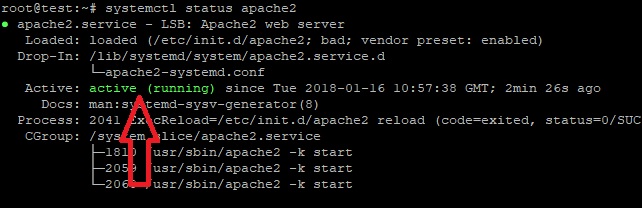
默认情况下,Apache 设置为在机器启动时自动启动,因此你不必手动启用它。你可以使用以下命令检查它是否正在运行以及其他相关信息:

systemctl status apache2

check if apache is running

并且你可以检查你正在使用的版本:

apachectl -V

一种更简单的检查方法时访问服务器的 IP 地址,如果你得到默认的 Apache 页面,那么一切都正常。

更新你的防火墙

如果你使用防火墙(你应该使用它),则可能需要更新防火墙规则并允许访问默认端口。Ubuntu 上最常用的防火墙是 UFW,因此以下说明使用于 UFW。

要允许通过 80(http)和 443(https)端口的流量,运行以下命令:

ufw allow 'Apache Full'

安装常见的 Apache 模块

一些模块经常被建议使用,所以你应该安装它们。我们将包含最常见模块的说明:

使用 PageSpeed 加速你的网站

PageSpeed 模块将自动优化并加速你的 Apache 服务器。

首先,进入 PageSpeed 下载页并选择你需要的的文件。我们使用的是 64 位 Ubuntu 服务器,所以我们安装最新的稳定版本。使用 wget 下载它:

wget https://dl-ssl.google.com/dl/linux/direct/mod-pagespeed-stable_current_amd64.deb

然后,使用以下命令安装它:

dpkg -i mod-pagespeed-stable_current_amd64.deb
apt-get -f install

重启 Apache 以使更改生效:

systemctl restart apache2
使用 mod\_rewrite 模块启动重写/重定向

顾名思义,该模块用于重写(重定向)。如果你使用 WordPress 或任何其他 CMS 来处理此问题,你就需要它。要安装它,只需运行:

a2enmod rewrite

然后再次重新启动 Apache。你可能需要一些额外的配置,具体取决于你使用的 CMS,如果有的话。为你的设置 Google 一下得到它的具体说明。

使用 ModSecurity 模块保护你的 Apache

顾名思义,ModSecurity 是一个用于安全性的模块,它基本上起着防火墙的作用,它可以监控你的流量。要安装它,运行以下命令:

apt-get install libapache2-modsecurity

再次重启 Apache:

systemctl restart apache2

ModSecurity 自带了一个默认的设置,但如果你想扩展它,你可以使用 OWASP 规则集

使用 mod\_evasive 模块抵御 DDoS 攻击

尽管 mod\_evasive 在防止攻击方面有多大用处值得商榷,但是你可以使用它来阻止和防止服务器上的 DDoS 攻击。要安装它,使用以下命令:

apt-get install libapache2-mod-evasive

默认情况下,mod\_evasive 是禁用的,要启用它,编辑以下文件:

nano /etc/apache2/mods-enabled/evasive.conf

取消注释所有行(即删除 #),根据你的要求进行配置。如果你不知道要编辑什么,你可以保持原样。

mod_evasive

创建一个日志文件:

mkdir /var/log/mod_evasive
chown -R www-data:www-data /var/log/mod_evasive

就是这样。现在重启 Apache 以使更改生效。

systemctl restart apache2

你可以安装和配置附加模块,但完全取决于你和你使用的软件。它们通常不是必需的。甚至我们上面包含的 4 个模块也不是必需的。如果特定应用需要模块,那么它们可能会注意到这一点。

用 Apache2Buddy 脚本优化 Apache

Apache2Buddy 是一个可以自动调整 Apache 配置的脚本。你唯一需要做的就是运行下面的命令,脚本会自动完成剩下的工作:

curl -sL https://raw.githubusercontent.com/richardforth/apache2buddy/master/apache2buddy.pl | perl

如果你没有安装 curl,那么你可能需要安装它。使用以下命令来安装 curl

apt-get install curl

额外配置

用 Apache 还可以做一些额外的东西,但我们会留下它们作为另一个教程。像启用 http/2 支持,关闭(或打开) KeepAlive,调整你的 Apache 甚至更多。这些东西你现在不需要做,但是如果你在网上找到了教程,并且如果你等不及我们的教程,那就去做吧。

使用 Apache 创建你的第一个网站

现在我们已经完成了所有的调优工作,让我们开始创建一个实际的网站。按照我们的指示创建一个简单的 HTML 页面和一个在 Apache 上运行的虚拟主机。

你需要做的第一件事是为你的网站创建一个新的目录。运行以下命令来执行此操作:

mkdir -p /var/www/example.com/public_html

当然,将 example.com 替换为你所需的域名。你可以从 Namecheap 获得一个便宜的域名。

不要忘记在下面的所有命令中替换 example.com

接下来,创建一个简单的静态网页。创建 HTML 文件:

nano /var/www/example.com/public_html/index.html

粘贴这些:

<html>
     <head>
       <title>Simple Page</title>
     </head>
     <body>
       <p>If you're seeing this in your browser then everything works.</p>
     </body>
</html>

保存并关闭文件。

配置目录的权限:

chown -R www-data:www-data /var/www/example.com
chmod -R og-r /var/www/example.com

为你的网站创建一个新的虚拟主机:

nano /etc/apache2/sites-available/example.com.conf

粘贴以下内容:

<VirtualHost *:80>
     ServerAdmin [email protected]
     ServerName example.com
     ServerAlias www.example.com
   
     DocumentRoot /var/www/example.com/public_html
    
     ErrorLog ${APACHE_LOG_DIR}/error.log
     CustomLog ${APACHE_LOG_DIR}/access.log combined
</VirtualHost>

这是一个基础的虚拟主机。根据你的设置,你可能需要更高级的 .conf 文件。

在更新所有内容后保存并关闭文件。

现在,使用以下命令启用虚拟主机:

a2ensite example.com.conf

最后,重启 Apache 以使更改生效:

systemctl restart apache2

这就是全部了,你做完了。现在你可以访问 example.com 并查看你的页面。


via: https://thishosting.rocks/how-to-install-optimize-apache-ubuntu/

作者:ThisHosting 译者:MjSeven 校对:wxy

本文由 LCTT 原创编译,Linux中国 荣誉推出